


Money manager & expenses
4.93.82K Reviews
App Specs
- Version
- 1.10.0
- Updated On
- License
- Free
- Downloads
- 10,000,000+
- Developer
- Cleaner + Antivirus + VPN company
- Categories
- Finance
- Platform
- Android, iOS
Screenshots
 Analysis by AppCompare
I find a money tracker most useful when it makes an ordinary decision easier: whether I can afford lunch out, how much a small errand actually cost, or why the week’s spending feels higher than expected. Money Manager & Expenses is aimed at that practical kind of awareness. It is a free finance app from Cleaner + Antivirus + VPN company, and its core appeal is keeping income and expenses visible without turning budgeting into a complicated project.
That focus makes it worth considering if you want a personal record of your spending and are willing to enter information yourself. It is less compelling if you expect a hands-off service that automatically gathers every transaction and does the bookkeeping for you. I would approach it as a tool for building a habit, not as a replacement for checking bank balances or making financial decisions.
First Impressions and Setup
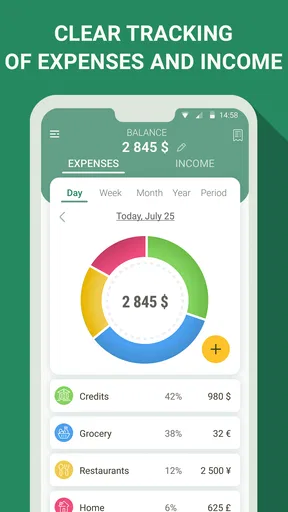
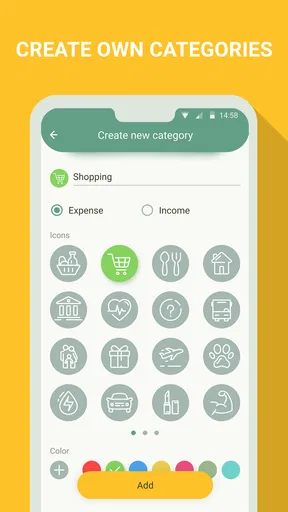
Diving into the app, the first thing that struck me was its clean and intuitive interface. No clutter, no fuss—just straightforward tabs and options. Setting up my account was a breeze, and within minutes I was ready to start tracking my expenses. The app asks for a few basic details, like your income sources and regular expenses, to get you started. It even lets you categorize everything, which is super handy for organizing your finances.
Readability, Navigation, and a Useful Routine
Now, let’s talk about user experience. Navigating through the app is a breeze, thanks to its user-friendly design. Even if you’re not the most tech-savvy person, you’ll find it pretty easy to figure out. The developers have clearly put a lot of thought into making it accessible for everyone.
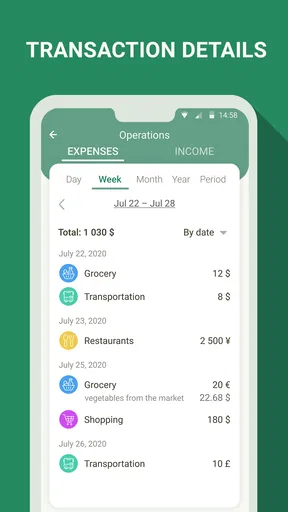
For me, the practical test is whether I can record a purchase while I still remember what it was. A quick entry after a grocery run is more useful than trying to reconstruct a week of small payments later. I’d keep categories simple at first—food, transport, bills, and personal spending—then split one only when the reports show that the distinction would help me make a decision. Too many categories can make logging feel like paperwork.
A realistic routine might be to enter a coffee and a transit fare on the way home, then review the week’s totals on Sunday. That gives the numbers context without demanding a full finance session every day. If a purchase is shared with someone else, I’d agree in advance whether to record the whole amount or only my share; consistent treatment matters more than creating a perfectly elaborate ledger.
Motor and Sensory Considerations
The straightforward layout is a welcome starting point for people who prefer familiar, uncomplicated navigation. Still, accessibility is personal: small controls, screen contrast, text scaling, and the amount of tapping required can matter as much as a tidy interface. I would try entering a few transactions on the device and display settings I actually use before committing to a daily routine.
Worth Reading Before You Choose

EA SPORTS FC Mobile 26 Is a Bigger Football Game, but It Takes Time

Flipboard Shows What News Apps Must Do Beyond the Feed

Switching to Android Auto Means Rethinking Your Driving Routine

Google Calendar Makes a Crowded Week Easier to Manage

Ludo King Makes the Most of the Minutes Between Plans

Baby Panda World Brings Quick Play to Modern Phones, but Its Game Library Feels Busy
Manual tracking also has a motor and attention trade-off. Each purchase requires an intentional action, which can be helpful when that pause encourages me to notice a habit, but frustrating if typing or navigating menus is difficult. A workable compromise is to log only meaningful categories or to set aside a short, predictable time to enter receipts, rather than forcing a perfect record after every tiny purchase.
Situational Access and Privacy
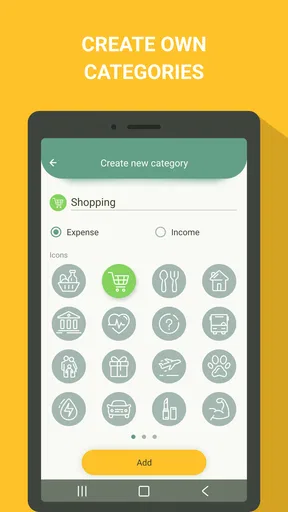
One of the standout features of Money Manager & Expenses is its ability to sync across devices. I can check my spending on my phone in the morning and continue on my tablet later in the day without missing a beat. The app also offers a variety of customizable categories for expenses and income, which means you can tailor it to fit your specific needs.
Being able to switch between a phone and tablet can suit someone who records expenses on the move but prefers reviewing them on a larger screen. I would still check that the same account and entries are showing on both devices before relying on a cross-device workflow. For a household, a useful habit is to decide who records shared purchases and when; otherwise, two people can enter the same bill or leave it out entirely.
Another thing I appreciate is the option for password protection. In a world where privacy is everything, knowing my financial data is secure gives me peace of mind. Plus, the app also supports biometric login, which is super convenient.
Those protections are useful when someone else might pick up your unlocked phone, but they do not remove the need for sensible device security. I would also think about where I review financial details: a private moment is preferable to checking a personal spending breakdown in a crowded setting. That is a small situational choice, but it can make a finance app more comfortable to use.
Budgets, Reports, and Practical Trade-Offs
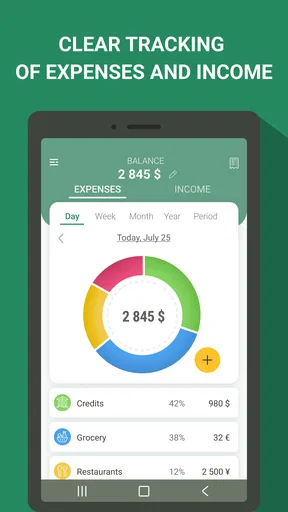
Another cool feature? The budget planner. It’s like having a financial advisor in your pocket. You can set monthly budgets for different categories, and the app will send you gentle reminders when you’re close to hitting those limits. Trust me, those reminders have saved me from more than a few impulse buys!
I’d treat a category limit as a prompt to pause, not as an automatic verdict that I have spent wisely or badly. A budget works best when it reflects real obligations: a high grocery month may come from stocking up, while a low one may simply mean another bill landed in a different category. Reviewing the reason behind a change keeps the tool useful instead of turning it into a source of guilt.
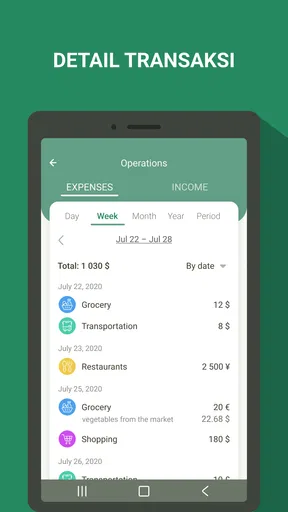
For all the data nerds out there, you’re going to love the detailed reports this app generates. You can view your spending patterns over weeks, months, or even years. The visual graphs make it easy to spot trends and adjust your budget accordingly. I found myself actually getting excited to check my monthly spending reports—who knew budgeting could be this engaging?
A helpful way to read a report is to look for a repeatable pattern rather than react to one unusual week. If transport rises during a busy period, I might compare it with a calmer month before changing the budget. Likewise, I’d use a consistent category system across the period being reviewed; renaming or splitting categories halfway through can make comparisons harder to interpret.
The app also allows for exporting reports in formats like Excel and PDF, which is perfect for those who like to keep a hard copy or need to share their financial health with a partner or financial advisor.
Exports can also be useful for a personal review away from the app: I could keep a copy for my own records or use a spreadsheet to examine a particular spending period. I would take care before sharing a report, since financial summaries can reveal more than a person intends. For routine household planning, discussing a few relevant totals may be more comfortable than sending someone a complete record.
Who It Suits—and Where It Can Fall Short
Money Manager & Expenses has a 4.9 average from around 464,000 ratings, and it has been installed over 10 million times. It is free to start, rated for Everyone, and its current version is 1.9.4, with support for Android 6.0 and up. Optional in-app purchases range from $1.99 to $59.99 per item, so I’d check the purchase details in the app before deciding whether any paid option is worthwhile. Its release date was July 13, 2020, and its thousands of written reviews add another reason many people have taken an interest in it, though popularity alone does not tell me whether its manual workflow fits my needs.
Compared with a bank’s built-in spending view, a dedicated tracker can give me more control over how I label transactions, but a bank may be more convenient when I want to see account activity without entering it again. Compared with a spreadsheet, this app offers a more ready-made place to record and review spending, while a spreadsheet gives a confident user more freedom to build custom calculations. The important trade-off is not which method is universally best; it is whether I will keep the chosen method current.
This app is a good fit for someone who wants to understand cash spending, plan category limits, or make a simple household record. It can also help a student or first-time budgeter notice how small purchases add up, provided they are comfortable entering them. I would look elsewhere if I needed automatic bank syncing as the foundation of my workflow, a highly specialized business ledger, or a system that does all tracking without regular input.
One non-obvious tip is to use the first month as a baseline rather than trying to make every category perfect immediately. Record transactions consistently, then adjust the categories and limits after seeing what actually happens. Another is to note recurring bills in the same way each time; inconsistent labels can make a report look like several unrelated expenses when they are really one monthly commitment.
Remaining Barriers and Final Thoughts
Of course, no app is perfect. While Money Manager & Expenses does a fantastic job at most things, there are a few features I’d love to see in future updates. For instance, integrating with more bank accounts directly would be great, as it would automate the process even further. Currently, manual entry is pretty seamless, but who wouldn’t love a little more automation?
Manual entry is the central limitation to weigh, not a minor detail. If I forget to log purchases for several days, the reports become less dependable, and catching up can be tedious. I would rather maintain a good-enough record than abandon the app while trying to account for every coin. People with limited time, difficulty typing, or irregular access to their device may find an automatic bank-linked alternative or a simpler note-taking method more sustainable.
Additionally, while the app is mostly glitch-free, I've experienced occasional lag during peak usage times. It's nothing major but something worth mentioning.
Ease of use also does not guarantee that every screen will work equally well for every person or situation. Someone who relies on larger text, assistive input, or strong visual contrast should test the actual transaction and report screens before depending on them. If using the app becomes uncomfortable, a paper log, a simplified spreadsheet, or an alternative designed around that person’s needs is a sensible choice—not a failure to budget.
All in all, Money Manager & Expenses is a solid choice for anyone looking to take control of their finances. It’s user-friendly, feature-packed, and offers enough flexibility to cater to a wide range of users. Whether you’re a seasoned budgeter or just starting out, this app provides all the tools you need to manage your money effectively.
My inclusive verdict is that its clearest strength is giving people a straightforward way to record, categorize, and review personal spending, with budgets and reports that can support a steady routine. Its usefulness depends on whether its navigation and manual logging suit your abilities and daily context. I’d recommend trying a modest workflow first—one or two important categories, a few days of entries, and a quick report review—before making it the center of your finances.
Give it a try, and you might just find yourself looking forward to budgeting every month! If you want to check it out, you can easily find it on both the Android and iOS app stores. Happy budgeting!
Pros
- Intuitive UI for easy navigation.
- Customizable categories for expenses.
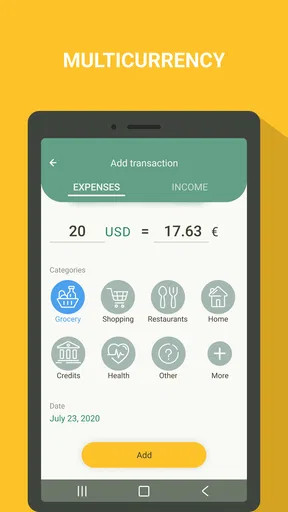
- Supports multiple currencies.
- Automatic backup to cloud.
- Detailed financial reports available.
Cons
- Limited features in free version.
- Ads can be intrusive at times.
- No integration with all banks.
- Lacks real-time collaboration.
- Occasional sync issues with cloud.
FAQs for Money manager & expenses
What features does the Money Manager & Expenses app offer?
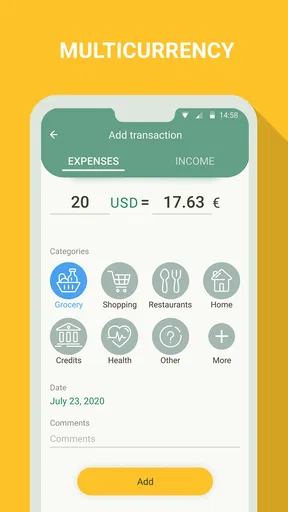
The Money Manager & Expenses app provides comprehensive budgeting tools, expense tracking, and financial reporting. Users can categorize expenses, set financial goals, and receive alerts for upcoming bills. The app also offers data synchronization across devices and supports multiple currencies, making it ideal for both personal and business use.
Is the Money Manager & Expenses app secure?
Yes, the Money Manager & Expenses app prioritizes user security by implementing strong encryption protocols and secure login options like biometrics or two-factor authentication. Additionally, the app does not store personal financial information on their servers, ensuring that your data remains private and protected.
Can I use the Money Manager & Expenses app offline?
Yes, the app allows offline usage, enabling you to enter and categorize expenses without an internet connection. Once you reconnect, the app will automatically sync your data. This feature is particularly useful for users on the go or in areas with limited internet access.
Does the Money Manager & Expenses app support multiple devices?
Absolutely. The app is designed with multi-device support in mind. Users can sync their accounts across smartphones and tablets, ensuring that their financial data is accessible and up-to-date no matter which device they use. This is achieved through cloud-based synchronization.
Is there a cost associated with using the Money Manager & Expenses app?
The app offers a free version with essential features, but also provides a premium version for a subscription fee. The premium version includes advanced features such as detailed financial reports, ad-free usage, and priority customer support. This allows users to choose a plan that best suits their needs.


